
3. Transactions
All transactions are recorded and stored for you to review, export or inspect individual transactions.
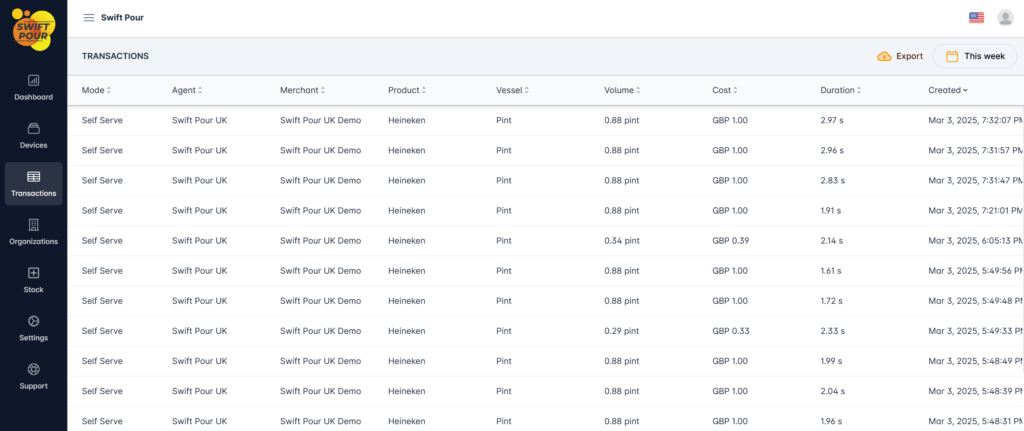
Clicking on a transaction will give you the detailed information for that transaction. You can also export the list to an excel document, allowing you to do your own reports etc.
Table Glossary
- Mode – Device Mode, when transaction was completed.
- Product – Configured against the device.
- Vessel – Configured against the device
- Volume – This displays the volume that was poured
- Cost – Displays the total cost of the pour.
- Duration – How long it took to pour
- Created – Date & Time of Transaction
Actions
- Date Range Picker
- Ability to filter the transaction based on a date range.
- Presets available, along with a custom range picker.
- Export
- The ability to export the data to an excel document\
- Please note, you are limited to the total number of transaction that can be exported in a single document.
- Should you receive the warning message, please change your date range to a shorter range.
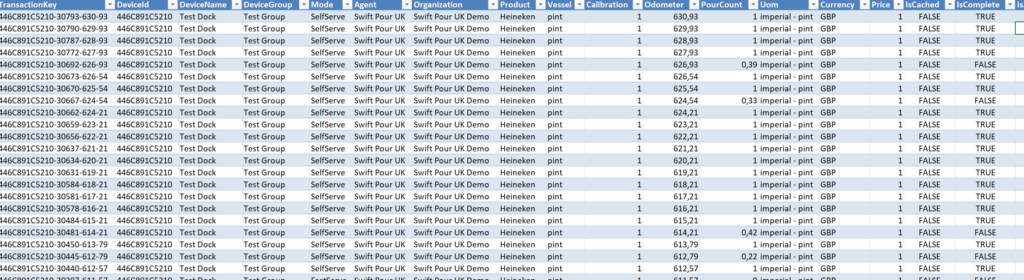
Document Glossary
The document contains all of the items above, along with a few more.
- TransactionKey
- Unique Transaction Identifier
- Device Name – Configured against the device.
- PourCount
- Percentage of pour 1 being 100% and anything below 1 is the fraction of, e.g 0.39 = 39% poured.
- Uom – Unit of measure – Configured against the device.
- Currency – Configured against the device.
- IsCached
- When there is a loss of internet connectivity and the device goes offline, transaction in certain modes are stored against the device. When the device comes back online, these sync.
- Please note, that Date & Time may be off for the devices if the dock is restarted before connecting to the internet and the Sync is started.
- IsAdjusted
- If the calibration does not match the volume being poured, we adjust the volume to be in alignment. This helps preserve the correct pouring volume for reporting.
- Value
- The Pour Volume in ml.