
1. Devices
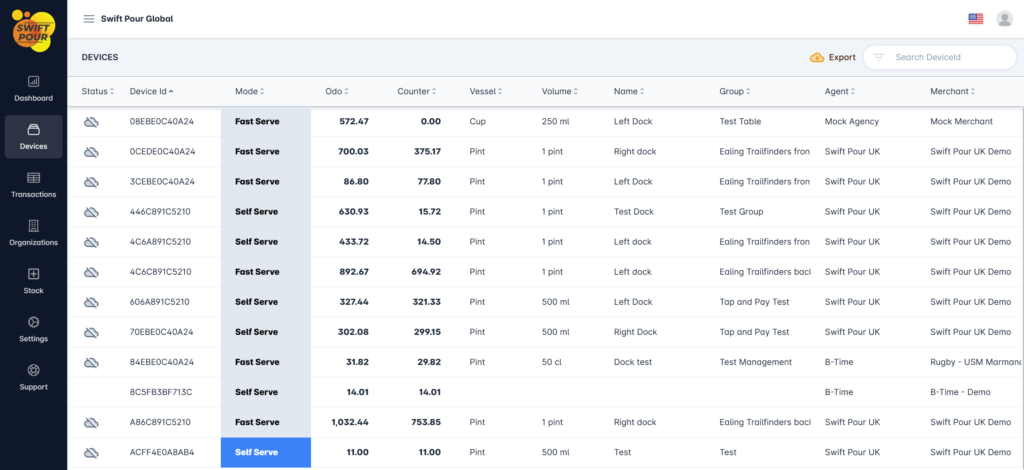
Under the devices menu tab, you will be able to view all the devices that are associated to your organization. You are able to filter the list, see what devices are active, manage each device and export a list for your records.
Device Details
Clicking on a device will slide out the details and provide actions items for your to manage the device. You are able to get detailed information, change the pouring mode, reset counters, restart the device and update pour related information.
Table Glossary
Below is a glossary of the items displayed:
- Status
- You are able to view the devices current status
- Online
- Offline
- Stored Transactions
- Credit Card Terminal Error
- You are able to view the devices current status
- DeviceId
- A unique identifier for the device
- Mode
- Will be highlighted with the associated color when online, or greyed out when offline.
- Fast Serve
- Self Serve
- Flush
- Calibrate
- Will be highlighted with the associated color when online, or greyed out when offline.
- Odo.
- Device Odometer / Pour Counter, total device pours
- Counter
- Event Counter, can be reset between events if necessary. All pours are recorded in transactions.
- Vessel – Captured against the device under settings
- Volume – Captured against the device under settings
- Group – Captured against the device under settings
Actions
- Filter
- Used to Filter the list of devices, helpful when there are many devices.
- Export
- Export the list of devices